How to Interpret Dot Plots
Dot plots are one of the fastest ways to see whether an assembly and a reference have the same large-scale structure. They are also easy to overinterpret. A dot plot is not a genome browser, not a variant caller, and not a proof that the reference is correct. It is a coordinate comparison built from alignment rows.
This tutorial is written for readers who know basic genetics and molecular biology, but may not have spent much time reading whole-genome alignment figures. The goal is to make the visual grammar explicit: what the axes mean, why some lines slope up or down, which patterns usually deserve follow-up, and which patterns are often harmless repeats or plotting artifacts.
The same ideas apply to chromo plot outputs and to the dot-plot panels inside
chromo manual.
The Core Idea
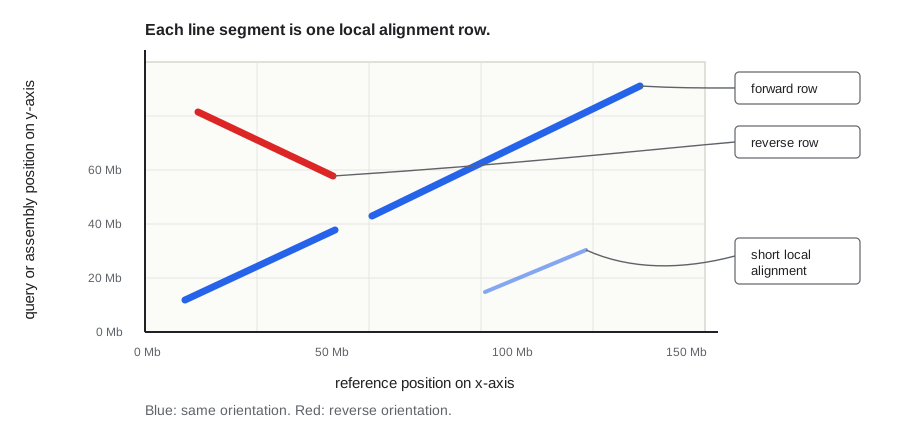
A dot plot places reference coordinates on one axis and assembly, or query, coordinates on the other. Each plotted segment says:
This interval of the query aligns to this interval of the reference.
If the two sequences are collinear and in the same orientation, the alignment forms an upward-sloping line. If the query interval is reverse-complemented relative to the reference, the line slopes downward. If one query contig aligns to two different references, or to distant parts of one reference, the plot will show separated blocks for that same query. That is often the first visual clue that a contig may be chimeric or that the assembly/reference relationship is biologically more complicated than one clean match.
Dot Plot Anatomy
In ChromoSort plots:
- The x-axis is the reference FASTA coordinate system.
- The y-axis is the query or assembly FASTA coordinate system.
- Each blue segment is a forward-strand local alignment.
- Each red segment is a reverse-strand local alignment.
- Whole-genome plots show all plotted reference sequences and query sequences.
- Per-reference plots focus on one reference sequence at a time.
The axes are measured in base pairs. Recent chromo plot outputs scale tick
labels to the current panel, using bp, kb, Mb, or Gb as appropriate. A bacterial
contig may be labeled in kb, a plant chromosome in Mb, and a whole pangenome
plot in Gb.
The exact angle is less important than the direction and continuity. A perfect forward match may not appear as a 45-degree line because the x-axis and y-axis can have different total lengths, and because a whole-genome plot may stack many chromosomes or contigs into one coordinate display. Read the line as a relationship between coordinates, not as a geometric ruler.
A Segment Is Not The Whole Contig
Alignment programs split real biological relationships into rows. One contig can produce many rows because of repeats, gaps, local divergence, structural variation, low-complexity sequence, or aligner heuristics. A single row can be very informative, but the biological interpretation comes from the pattern of all rows together.
Before interpreting a plot, check five things:
- Which exact reference FASTA and assembly FASTA produced the coords or PAF?
- Were secondary alignments included or filtered?
- Were short or low-identity rows filtered before plotting?
- Is this a whole-genome plot or a per-reference plot?
- Could the reference itself differ from the sample being assembled?
That first question matters most. If the plot was generated from raw.fa, it
still describes raw.fa, even if a later command wrote fixed.fa,
ordered.fa, or a scaffold FASTA. Re-align changed FASTA outputs before using
plots as final validation.
Pattern Gallery
The examples below are simplified cartoons. Real plots are messier, but these patterns are the alphabet you use to read them.
Clean Collinear Placement
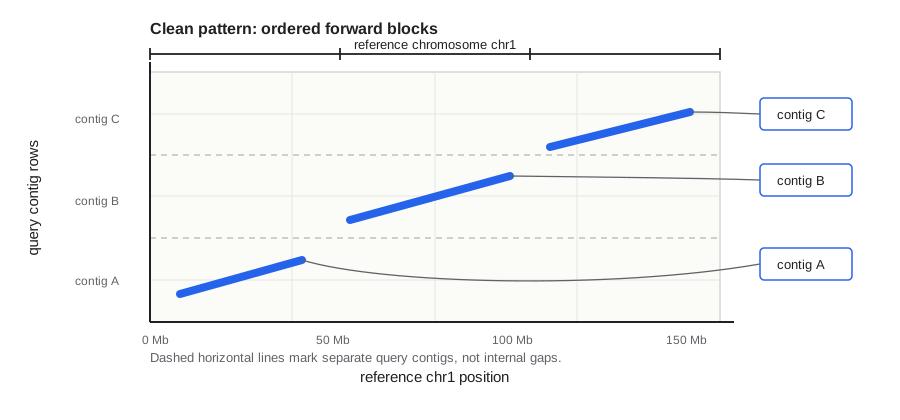
What it looks like: long blue segments form an ordered diagonal across one reference. If several contigs cover the reference, they appear as separate diagonal pieces that progress from left to right.
Most likely interpretation: the assembly is broadly syntenic with the reference. The contigs may still need ordering, orientation, trimming, or scaffolding, but the large-scale evidence is calm.
How to follow up:
- Use
chromo sortto assign and order contigs. - Use
--orient-to-referencewhen you want output contigs oriented to match the reference. - Inspect assignment reports for duplicate overlap filtering, low support, or unplaced contigs.
Reverse-Complemented Contig
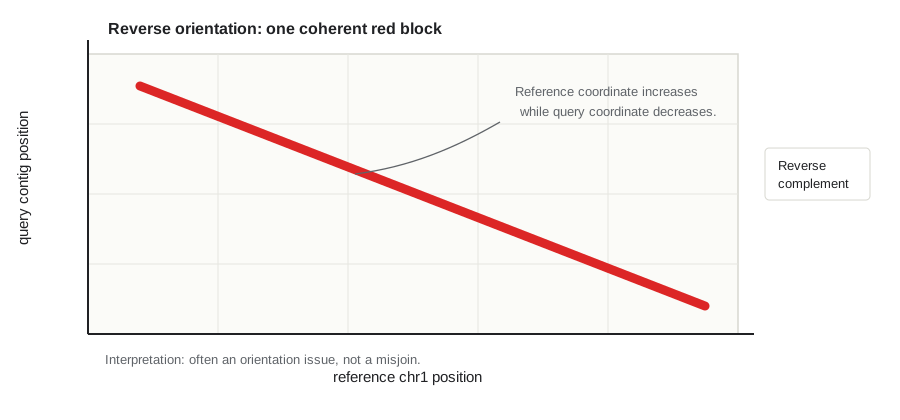
What it looks like: one long red segment connects a query contig to one reference region. The segment is internally continuous, but slopes downward.
Most likely interpretation: the contig is reverse-complemented relative to the reference. That is not automatically an error. Assemblers do not know the reference orientation, and either DNA strand can be reported.
How to follow up:
- If the contig has one dominant reference assignment, this is usually an orientation issue, not a split candidate.
chromo sort --orient-to-referencecan orient retained contigs to match the reference.- Be more cautious if the red block is one part of a larger mixed-orientation pattern within the same contig.
Multi-Reference Or Chimeric Contig
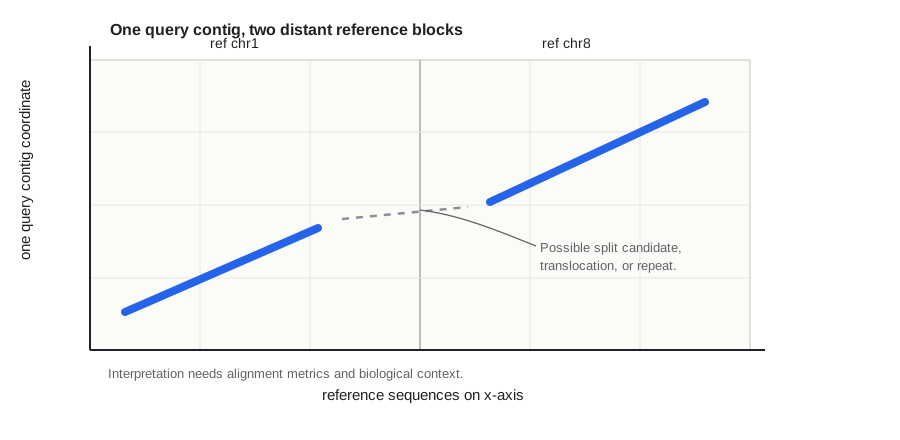
What it looks like: the same query contig has large blocks on two references, or on far-apart positions of one reference. The blocks may have different orientations.
Most likely interpretation: this is a high-priority review pattern. It can mean a misjoined contig, but it can also reflect a real structural difference, shared repeats, duplicated sequence, or an imperfect reference.
How to follow up:
- Check whether both blocks are long, high-identity, and high-scoring.
- Look at
best_ref_share, total aligned bases, and per-reference match reports. - Use
chromo manualorchromo fixonly after deciding that the contig is a real split candidate. - If graph context is available, inspect whether assembly graph edges support the junction or suggest two separate neighborhoods.
Internal Inversion
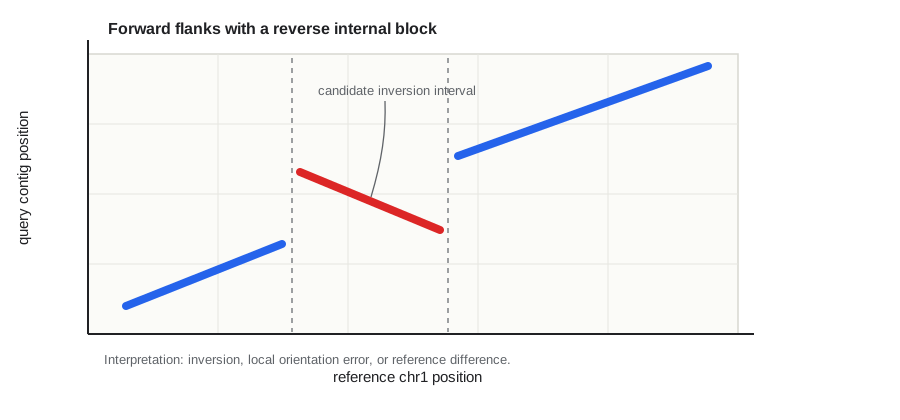
What it looks like: one contig mostly follows the reference, but an internal block switches orientation. The plot often shows blue forward flanks and a red reverse segment in the middle.
Most likely interpretation: there may be an inversion relative to the reference. The inversion could be real biology, a reference difference, or an assembly problem. Dot plots show the pattern, not the cause.
How to follow up:
- Check whether the boundaries are sharp and supported by long alignments.
- Confirm with read evidence, assembly graph structure, or another reference if available.
- Do not automatically split an inversion. A true inversion is not fixed by deleting sequence; it may be left as-is, reoriented, or explicitly reported depending on your goal.
- For pangenome graph inputs, review the inversion as evidence before deciding whether to keep it native or create a separate reference-normalized experimental FASTA. See the Agent and Review Playbook.
Duplication, Haplotig, Or Repeat
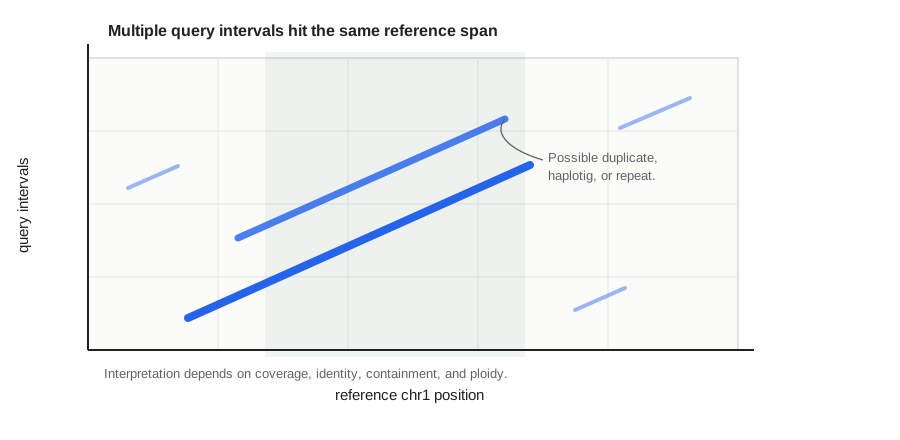
What it looks like: two or more query intervals align to the same reference region. Sometimes one contig covers the full interval while another shorter contig sits inside it. Repeats may also appear as many short segments scattered across the plot.
Most likely interpretation: this may be redundant assembly, an alternate haplotig, a true duplication, or repeat-mediated ambiguity. In plant genomes, this pattern is common because repeats, segmental duplications, and homeologous or paralogous regions can produce legitimate extra hits.
How to follow up:
- Compare aligned length, identity, coverage, and assignment status.
- Treat contained low-support matches differently from long unique matches.
- Use the duplicate-overlap columns in ChromoSort reports to see why a contig was kept or discarded.
- If ploidy or haplotype structure matters, avoid collapsing possible biological copies without additional evidence.
Missing Coverage Or Large Gaps
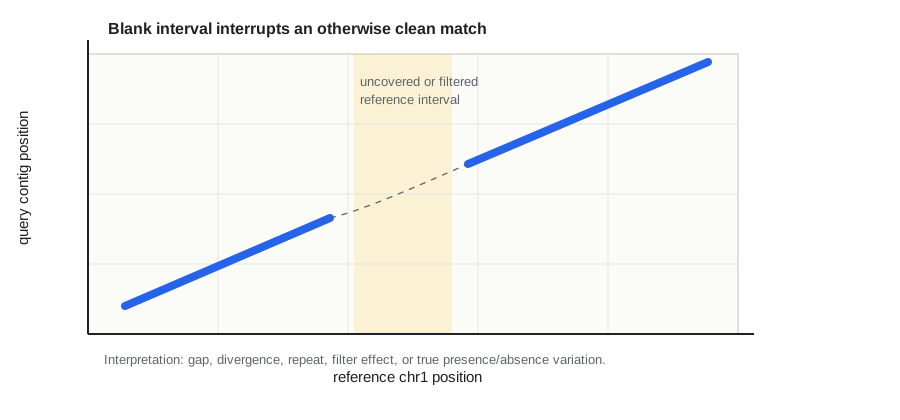
What it looks like: a diagonal line stops and resumes later, leaving a blank reference interval, a blank query interval, or both.
Most likely interpretation: there is an alignment interruption. The reason may be a true deletion/insertion, assembly gap, collapsed repeat, reference-specific sequence, sample-specific sequence, or filtering.
How to follow up:
- Check whether the gap corresponds to Ns, assembly breaks, centromeres, telomeres, or highly repetitive sequence.
- Try less strict plotting filters if expected syntenic sequence disappeared.
- Use per-reference plots to separate real blank regions from whole-genome compression.
- Do not assume absence from a blank plot region until you know aligner and filter behavior.
Off-Target Speckles And Secondary Hits
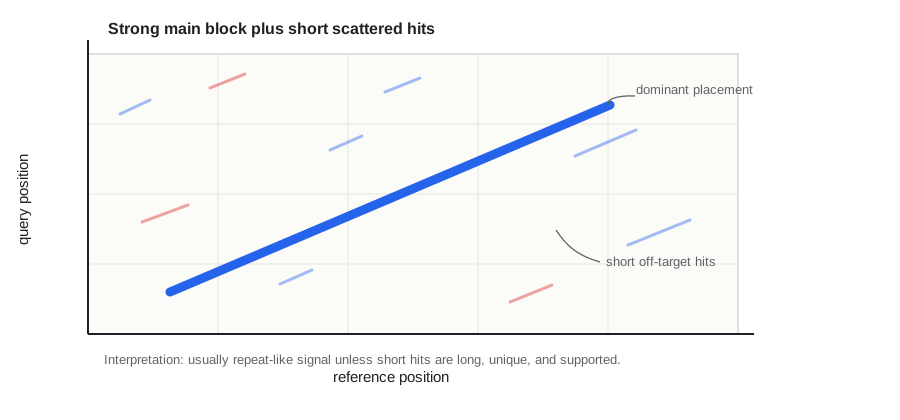
What it looks like: one strong diagonal block is accompanied by many short segments elsewhere. These can look dramatic in a compressed whole-genome plot.
Most likely interpretation: many small off-target hits are repeats, low-complexity sequence, paralogous fragments, or secondary alignments. They are useful clues, but they are usually weaker evidence than long unique blocks.
How to follow up:
- Increase
--min-segment-bp,--min-segment-idy, or--min-mapqto see whether the main pattern remains. - For PAF, remember that secondary alignments are skipped by default unless
--include-secondary-pafis set. - Use per-reference plots to inspect suspected events without whole-genome clutter.
Whole-Genome View Versus Per-Reference View
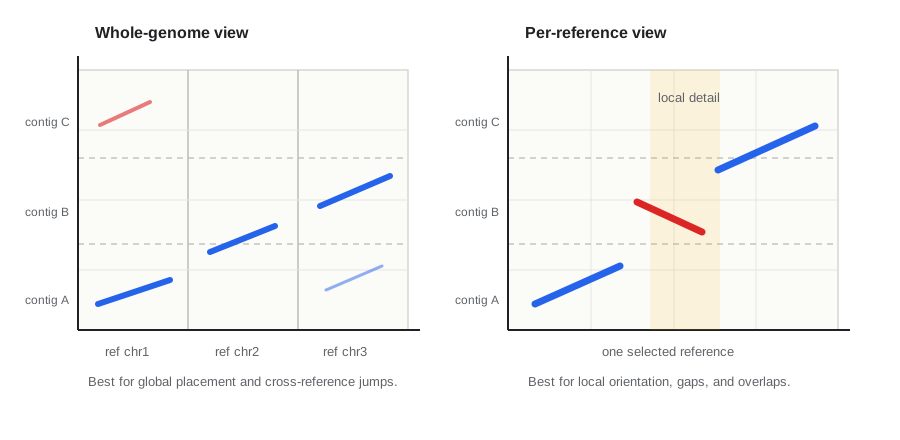
Whole-genome plots are best for asking broad questions:
- Does each query contig mostly belong to one reference?
- Are there obvious chromosome swaps or multi-reference contigs?
- Are many contigs reversed, duplicated, or unplaced?
- Does the plot look like the expected genome-wide synteny pattern?
Per-reference plots are best for local review:
- Are contigs ordered cleanly along this reference?
- Is a blank interval real or just hidden by whole-genome compression?
- Does one contig have an internal orientation switch?
- Which duplicated or overlapping contigs cover this reference interval?
Use both. Start wide, then zoom in.
A Practical Review Workflow
-
Start with the whole-genome plot. Look for major diagonals, chromosome swaps, multi-reference contigs, and large blocks in unexpected places.
-
Open the per-reference plots. Per-reference plots reduce clutter and make it easier to inspect local order, gaps, overlap, and orientation.
-
Identify the dominant placement for each suspicious contig. Ask which reference gets most of the aligned bases and whether the strongest alignment is long and coherent.
-
Classify the interruption. Is it a simple reverse orientation, an internal inversion, a distant jump, a duplicate overlap, a gap, or mostly short repeat-like noise?
-
Cross-check reports. Use
contig_assignments.tsv,contig_ref_matches.tsv,match_report.tsv,fix_report.tsv, or manual dashboard details to compare the visual pattern with alignment lengths, identity, overlap class, and keep/discard decisions. -
Decide the action. A clean reversed contig may only need orientation. A strong multi-reference contig may need manual review or splitting. A weak speckle pattern may need filtering rather than editing. A real biological structural difference may need to be preserved and documented.
Cheat Sheet
| Pattern | Common interpretation | Good next question |
|---|---|---|
| Long blue diagonal | Same order and orientation as the reference | Do reports support keeping and ordering this contig? |
| Long red diagonal | Reverse-complemented relative to the reference | Is it one coherent block or part of a mixed pattern? |
| One contig hits two references | Possible chimera, translocation, repeat, or reference difference | Are both blocks long, high-identity, and graph-supported? |
| Blue flanks with a red middle block | Possible inversion | Are the breakpoints sharp and independently supported? |
| Several contigs hit the same reference span | Duplicate, haplotig, repeat, or real copy-number difference | Which copy has the strongest unique support? |
| Blank reference interval | Missing assembly, filtered alignment, repeat, or true absence | Does a less filtered plot or another evidence type recover it? |
| Many tiny off-target hits | Repeats, paralogs, low-complexity sequence, or secondary alignments | Does the main placement remain after filtering short hits? |
| Whole-genome plot looks crowded | Compression hides local structure | What does the per-reference panel show? |
Common Traps
Do not treat every small dot as a structural variant. Short matches can be repeats, paralogs, low-complexity DNA, or aligner noise.
Do not assume the reference is perfect. A clean assembly can disagree with a reference because of true biology, reference assembly errors, cultivar differences, or haplotype differences.
Do not validate an edited FASTA with an old alignment. If a command changed the FASTA, make a new coords or PAF before drawing final plots.
Do not mistake reverse orientation for a broken contig. A single long red block is often easy to orient. Mixed-orientation blocks inside one contig deserve more review.
Do not collapse possible haplotigs or duplications without context. Redundancy can be an assembly artifact, but it can also reflect real copy number, polyploidy, heterozygosity, or paralogous sequence.
Do not read whole-genome plots alone. They are excellent for finding big patterns, but local decisions usually need per-reference plots and TSV reports.
What To Look At Next In ChromoSort
- Use
chromo plotto generate whole-genome and per-reference plots from existing coords or PAF files. - Use
chromo manualwhen you need interactive per-contig review, breakpoint staging, or recipe export. - Use
chromo fixonly after a contig looks like a reviewed split candidate. - Use
chromo sortwhen the major problem is ordering, filtering, and orienting contigs rather than splitting them.
The strongest dot-plot interpretations combine visual pattern, alignment metrics, and biological context. The plot tells you where to look. The decision comes from checking whether the visual pattern is supported by the rest of the evidence.
Brief History And Further Reading
Dot plots are one of the older ideas in sequence analysis. Before whole-genome alignment viewers, genome browsers, and interactive pangenome tools, a dot-matrix comparison gave researchers a direct way to see whether two sequences shared order, orientation, repeats, insertions, deletions, or rearrangements. The core visual idea has stayed useful because it is simple: plot matching intervals between two coordinate systems and let large-scale structure become visible.
As genomes became larger, dot plots became tied to faster whole-genome alignment methods. Tools such as MUMmer made chromosome-scale sequence comparison practical, minimap2 made compact PAF-based assembly alignments fast and common, and modern interactive tools made large dot plots easier to browse. ChromoSort uses the same conceptual tradition: the plot is not the decision, but it is often the fastest way to notice where the decision should begin.
Further reading:
- Gibbs and McIntyre 1970. The diagram, a method for comparing sequences.
- Delcher et al. 1999. Alignment of whole genomes.
- Kurtz et al. 2004. Versatile and open software for comparing large genomes.
- Li 2018. Minimap2: pairwise alignment for nucleotide sequences.
- Cabanettes and Klopp 2018. D-GENIES: dot plot large genomes in an interactive, efficient and simple way.
What To Read Next
- How to decide when to fix a contig for deciding when a suspicious dot-plot pattern is strong enough to justify changing sequence.
- How scaffolding works for turning ordered contigs into scaffold records while keeping uncertainty visible.
- How gap filling works for deciding when graph or read evidence can replace scaffold Ns with sequence.
- Choosing PAF or MUMmer coords for choosing the alignment evidence that produces the plot.