chromo manual
Use chromo manual when you want to make reviewed assembly edits in a browser
instead of asking ChromoSort to choose breakpoints or filters automatically. The
command writes one HTML file with embedded CSS, JavaScript, reference/assembly
metadata, contig ordering, and alignment rows. No external web assets are
required.
The dashboard starts with every assembly contig present. Aligned contigs are ordered by reference FASTA order and reference coordinate. Unaligned contigs are kept at the end until you remove them.
chromo manual can combine sorting-style and fixing-style review in one human
workflow: you can remove unaligned contigs, reorder pieces, invert pieces, add
breakpoints, label scaffolds, and export a reviewed FASTA or recipe. Task modes
chromo manual fix, chromo manual scaffold, and chromo manual gapfill add
a focused review-event queue from chromo eval tables while keeping the same
browse-around dashboard. The dot plots in the dashboard still come from the
original coords or PAF file. After exporting a manual FASTA, re-run MUMmer or
minimap2 before using that FASTA as the assembly input to chromo sort,
chromo plot, chromo scaffold, or other alignment-dependent steps.
Run chromo manual
chromo manual \
  --ref-fasta reference.fa \
  --assembly-fasta assembly.fa \
  --coords mummer/sample.coords \
  --gfa assembly_graph.gfa \
  --output-html results/sample.manual.html \
  --suggested-output-fasta sample.manual.fa
The same dashboard can be generated from PAF:
chromo manual \
  --ref-fasta reference.fa \
  --assembly-fasta assembly.fa \
  --paf paf/sample.paf \
  --output-html results/sample.manual.html
Run A Task-Specific Manual Dashboard
chromo eval fix \
  --assembly-fasta assembly.fa \
  --coords mummer/sample.coords \
  --all \
  --output-prefix results/sample.eval_fix

chromo manual fix \
  --ref-fasta reference.fa \
  --assembly-fasta assembly.fa \
  --coords mummer/sample.coords \
  --review-table results/sample.eval_fix.fix_review.tsv \
  --gfa assembly_graph.gfa \
  --read-paf paf/reads_to_assembly.paf \
  --gaf graph_alignments/reads_to_graph.gaf \
  --output-html results/sample.manual_fix.html
The same pattern works for chromo manual scaffold with
<prefix>.scaffold_review.tsv and chromo manual gapfill with
<prefix>.gapfill_review.tsv. A task dashboard embeds the shared review events,
shows them as a queue, and selecting an event focuses the corresponding contig
or junction target when that source is present in the dashboard FASTA.
When --gfa is provided, the manual dashboard embeds per-contig graph context
beside the dot plot review. Contig badges and details show whether the matching
GFA node is present, whether its local neighborhood is simple, branching, or
self-looped, node coverage tags such as RC:i, in/out degree, neighbor count,
and oriented neighboring nodes. The selected-contig detail panel also shows
immediate upstream/downstream graph neighbors, link orientation, overlap
lengths, and whether each neighbor is aligned to the same best reference. This
borrows the useful graph-inspection idea from Gap-Graph while keeping
ChromoSort’s sequence-changing actions explicit in the manual recipe. An
example graph-aware dashboard is shown in the output section below.
Task dashboards also expose modular evidence panels for the selected event.
The alignment panel is always available because --coords or --paf is
required. GFA, long-read PAF, and long-read GAF panels appear when the
corresponding file is provided or when the review table contains matching
graph_*, longread_*, or gaf_* fields from chromo eval. This keeps the
dashboard useful when only one evidence stream exists, while making conflicting
or complementary support visible when several streams were generated.
The dashboard generator records optional --read-paf and --gaf paths and
displays matching review-table fields; it does not independently recompute
long-read support in the browser HTML.
For large genomes, the dashboard embeds alignment metadata but not full FASTA
sequences by default. Open the HTML file in a browser, load the original
assembly FASTA with the file picker, then export the edited FASTA. For tiny
assemblies, demos, or tests, use --embed-sequences so the HTML can export
FASTA without loading the source FASTA in the browser:
chromo manual \
  --ref-fasta reference.fa \
  --assembly-fasta assembly.fa \
  --coords mummer/sample.coords \
  --output-html results/sample.manual.html \
  --embed-sequences
Use the Manual Dashboard
The manual dashboard provides:
- A reference-ordered contig/piece list with every contig retained initially.
- A per-contig dot plot. Forward alignments are blue; reverse alignments are red. See the dot-plot guide for examples of common patterns to look for during review.
- Optional GFA node badges and neighbor details when generated with
--gfa. - An optional task-specific review-event queue when generated with
--review-table. - Modular evidence panels for alignment, GFA, long-read PAF, and long-read GAF support when those inputs or review-table fields are available.
- A graph filter for
simple,branching,self_loop, andmissinggraph neighborhoods, plus a read-only neighborhood panel for the selected contig. - A click-to-stage breakpoint position from the selected contig dot plot.
- Buttons to remove/restore a contig or piece, move it up/down, invert it, and add a breakpoint.
- A
Remove unalignedbutton for quickly excluding unplaced contigs. - A scaffold label for each active piece and a scaffold-export toggle that joins pieces with configurable N gaps.
- FASTA export and recipe JSON export.
Browser security prevents a static HTML file from silently overwriting arbitrary local paths. FASTA export is therefore a normal browser download, and the original FASTA is never modified.
Apply a Manual Recipe
The dashboard can export a recipe JSON file. Apply that recipe from the command line for reproducible runs:
chromo manual apply \
  --assembly-fasta assembly.fa \
  --recipe chromosort.manual.recipe.json \
  --output-fasta results/sample.manual.fa \
  --report results/sample.manual.tsv
Use --scaffold or --no-scaffold to override the recipe export mode, and
--gap-bp to override the recipe gap size.
manual apply writes a fresh AGP, component TSV, and submission checklist for
the FASTA it emits. In scaffold mode, active pieces become AGP component rows
and inserted N gaps become AGP gap rows. The default manual scaffold gap
metadata is AGP contig/no/na; set --agp-gap-type, --agp-linkage, and
--agp-linkage-evidence explicitly when you have evidence for a different NCBI
gap category.
chromo manual Outputs
| Output | Description |
|---|---|
--output-html |
Self-contained manual-edit dashboard with embedded alignment/order metadata and optional embedded sequences. |
| Browser FASTA download | Edited FASTA exported from the dashboard. The source FASTA is not modified. |
| Browser recipe download | JSON recipe describing the current manual edits. |
chromo manual apply --output-fasta |
FASTA generated by applying a recipe from the command line. |
chromo manual apply --report |
Optional TSV report of emitted pieces and removed pieces. |
chromo manual apply --agp / default <output-fasta>.agp |
AGP 2.1 map for the manual-apply FASTA. |
chromo manual apply --components / default <output-fasta>.components.tsv |
Human-readable provenance table mirroring the manual AGP rows. |
chromo manual apply --submission-checklist / default <output-fasta>.submission_checklist.tsv |
FASTA/AGP consistency checks and file manifest for downstream submission packaging. |
Example chromo manual Output
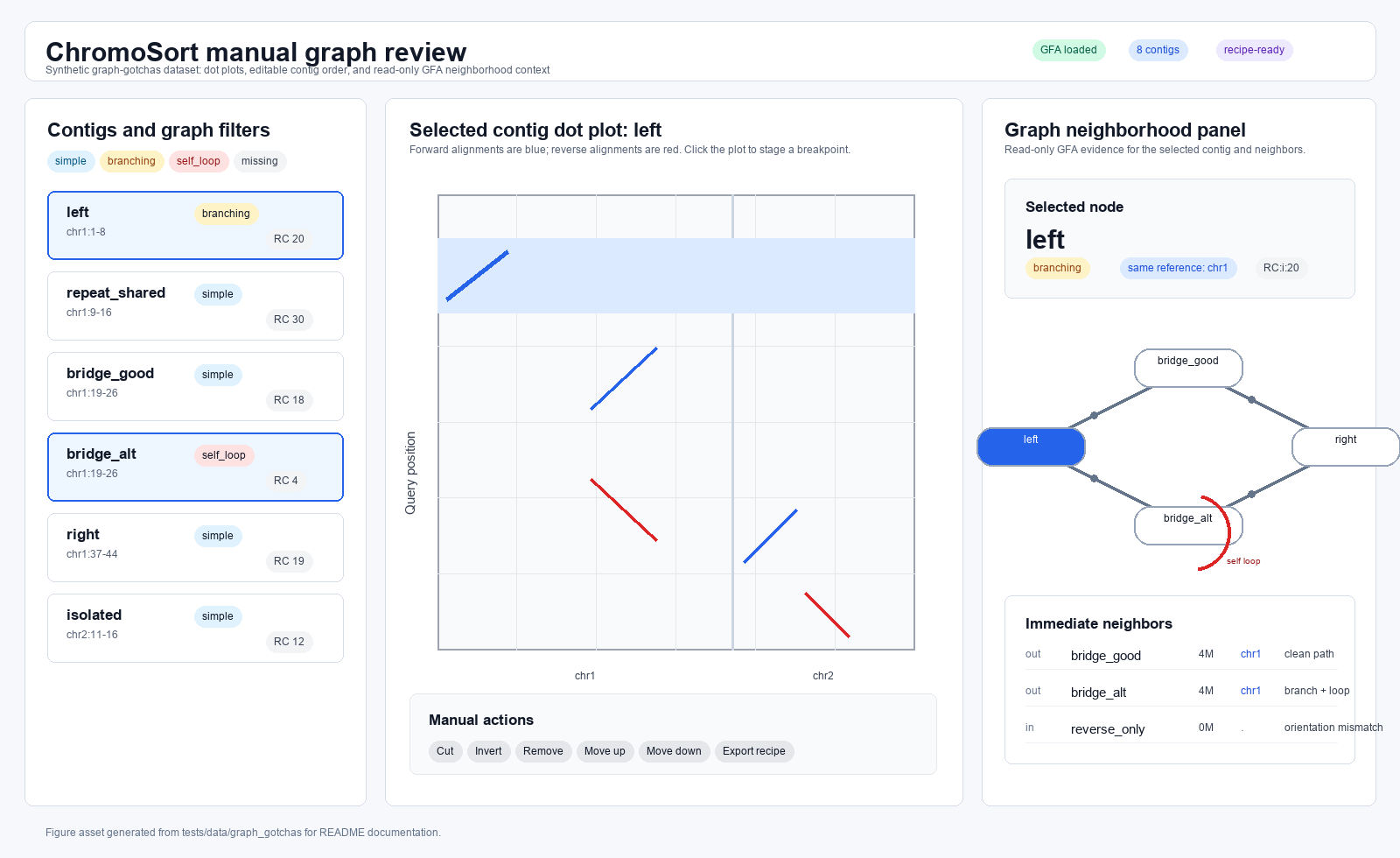
chromo manual dashboard output. The self-contained HTML dashboard combines a contig list, dot-plot review panel, graph-neighborhood filters, and read-only GFA context for the selected contig.Table 1. Example chromo manual apply report rows. The command-line apply
step writes the same piece-level audit information needed to reproduce a
browser-reviewed recipe.
| piece_id | source | output_name | scaffold | slice_start | slice_end | piece_bp | strand | removed | export_mode |
|---|---|---|---|---|---|---|---|---|---|
contigA |
contigA |
contigA_manual001 |
chr1 |
1 |
80 |
80 |
+ |
no |
pieces |
contigB |
contigB |
contigB_manual002 |
chr1 |
1 |
40 |
40 |
+ |
no |
pieces |
contigNo |
contigNo |
contigNo_manual003 |
unplaced |
1 |
30 |
30 |
+ |
no |
pieces |
Listing 1. Example manual-apply FASTA records. Browser edits become ordinary FASTA records with the original source contig, slice interval, strand, and scaffold label in the header.
>contigA_manual001 original=contigA slice=1-80 strand=+ scaffold=chr1
AAAAAAAAAAAAAAAAAAAAAAAAAAAAAAAAAAAAAAAAAAAAAAAAAAAAAAAAAAAAAAAAAAAAAAAAAAAAAAAA
>contigB_manual002 original=contigB slice=1-40 strand=+ scaffold=chr1
TTTTTTTTTTTTTTTTTTTTTTTTTTTTTTTTTTTTTTTT
chromo manual Parameters
| Parameter | Default | Meaning |
|---|---|---|
--ref-fasta |
required | Reference FASTA used for ordering and dot-plot axes. |
--ref-fai |
auto | Optional reference FASTA index. Defaults to <ref-fasta>.fai when present. |
--assembly-fasta |
required | Assembly FASTA whose contigs should be reviewed. |
--assembly-fai |
auto | Optional assembly FASTA index. Defaults to <assembly-fasta>.fai when present. |
--coords |
required unless --paf |
MUMmer show-coords alignment file. |
--paf |
required unless --coords |
minimap2 PAF alignment file. |
--output-html |
required | Dashboard HTML path. |
--suggested-output-fasta |
<assembly>.manual.fa |
Suggested browser download filename for FASTA export. |
--embed-sequences |
off | Embed full assembly sequences in the HTML for single-file export. Best for small assemblies. |
--gfa |
none | Optional assembly graph GFA for per-contig node status, graph complexity, degree, coverage tag, and neighbor context. |
--read-paf |
none | Optional long-read-to-assembly PAF path recorded for task evidence panels. Matching longread_* fields from eval review tables are shown beside the selected event. |
--min-read-mapq |
0 |
MAPQ threshold recorded for optional long-read PAF evidence panels. |
--gaf |
none | Optional long-read-to-graph GAF path recorded for task evidence panels. Matching gaf_* fields from eval review tables are shown beside the selected event. |
--min-gaf-mapq |
20 |
MAPQ threshold recorded for optional long-read GAF evidence panels. |
--review-table |
none | Optional shared review-event TSV from chromo eval; in manual fix, manual scaffold, and manual gapfill, events are embedded as a focused queue. |
--min-segment-bp |
0 |
Minimum alignment row length to embed in the dashboard. |
--min-segment-idy |
0.0 |
Minimum percent identity for embedded alignment rows. |
--min-mapq |
0 |
Ignore PAF rows below this MAPQ. Ignored for coords. |
--include-secondary-paf |
off | Include PAF rows marked tp:A:S; skipped by default. |
--max-segments |
0 |
Maximum number of alignment rows to embed; 0 means no limit. |
chromo manual apply Parameters
| Parameter | Default | Meaning |
|---|---|---|
--assembly-fasta |
required | Original assembly FASTA referenced by the browser recipe. |
--recipe |
required | Recipe JSON exported from the manual dashboard. |
--output-fasta |
required | FASTA generated by applying the recipe. |
--report |
none | Optional TSV report of emitted and removed pieces. |
--agp |
<output-fasta>.agp |
Output AGP 2.1 map for the manual-apply FASTA. |
--components |
<output-fasta>.components.tsv |
Output component-provenance TSV mirroring the manual AGP rows. |
--submission-checklist |
<output-fasta>.submission_checklist.tsv |
Output FASTA/AGP handoff and file-manifest checklist. |
--scaffold / --no-scaffold |
recipe export mode | Override whether active pieces are written as scaffold records or separate records. |
--gap-bp |
recipe gap size | Override the N-gap size inserted between pieces in scaffold mode. |
--agp-gap-type |
contig |
AGP gap type for N gaps inserted in manual scaffold mode. |
--agp-linkage |
no |
AGP linkage value for N gaps inserted in manual scaffold mode. |
--agp-linkage-evidence |
na |
AGP linkage evidence for N gaps inserted in manual scaffold mode. |